
AdsPower Proxy Connection Failed: Causes & Fix
“Proxy check failed” in AdsPower almost never means you configured something wrong. In most cases it means the proxy itself is dead or timed out. The fastest way to confirm it: take the IP:port from the error log and check it against a proxy checker — if it comes back dead, replace the proxy and move on, no AdsPower setting needs to change.
The error, exactly as AdsPower shows it
Pop-up title: Proxy check failed
Message: “Unable to connect to the proxy server. Please check your proxy settings and try again.”
Log detail shown under the pop-up:
Proxy: 89.31.12.56:1080
Type: SOCKS5
Error: Connection timeout
Check time: 2025-08-15 14:30:25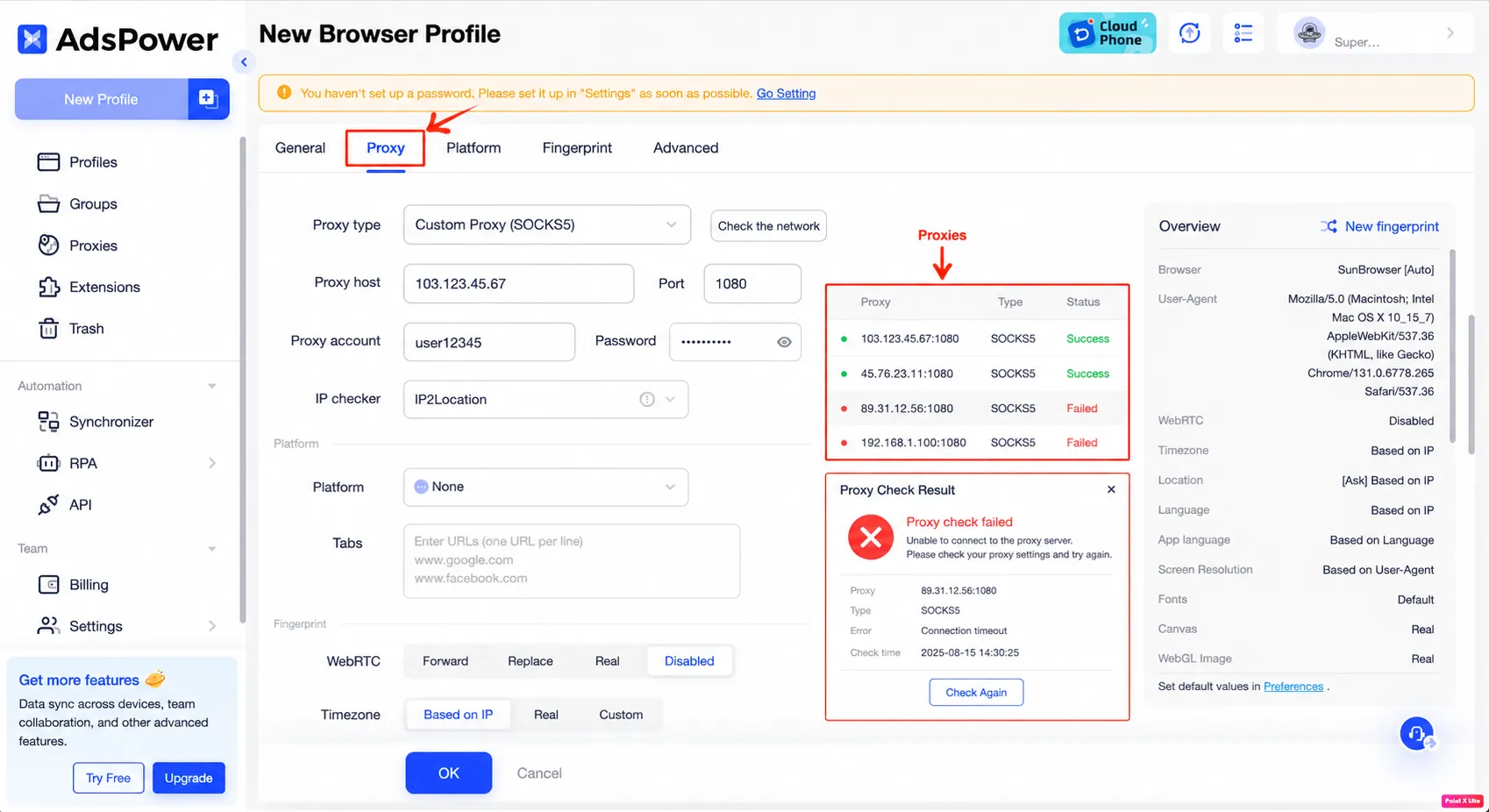
In the current AdsPower version, proxy configuration lives in its own Proxy tab next to General on the New Browser Profile screen — it’s no longer part of the same scrolling page as older versions. To reproduce this error: set Proxy type to Custom Proxy (SOCKS5), pick IP2Location as the IP checker, then click Check the network.
Proxy-dead vs. config-error: how to tell them apart
AdsPower can check several proxies at once and lists them on the right with a status dot for each. In the screenshot above:
- 🟢
103.123.45.67:1080— Success - 🟢
45.76.23.11:1080— Success - 🔴
89.31.12.56:1080— Failed (Connection timeout) - 🔴
192.168.1.100:1080— Failed
Those two red rows are not the same kind of failure, even though AdsPower shows them identically:
89.31.12.56:1080is a public IP that timed out — this is a dead or unreachable proxy. The server isn’t responding, which is exactly what “Connection timeout” means.192.168.1.100:1080is a private/LAN address (the192.168.0.0/16range). No residential or datacenter proxy provider hands out an address in that range — if you see a192.168.x.x,10.x.x.x, or172.16.x.x–172.31.x.xaddress failing, that’s a typo or wrong value pasted into the proxy field, not a dead proxy. Checking it against any external proxy checker is pointless; it will never be reachable from the internet.
So before assuming your whole proxy list is down: separate the failed rows into “real public IP that timed out” and “private-range IP that was never going to work.” Only the first group is worth spending time checking.
Check if the proxy is actually dead
For the public-IP case, don’t guess — check it. Take the exact IP and port from the AdsPower log (89.31.12.56:1080 in this example) and run it through a free SOCKS5 checker like socksv5.net before touching any AdsPower setting. If the result comes back dead or times out there too, the problem is confirmed to be the proxy, not your AdsPower configuration — swap the proxy and re-test.
Fix, step by step
- Open the profile → Proxy tab (next to General).
- Copy the exact IP and port from the failed row or from the log pop-up. Don’t retype it — copy/paste to rule out a typo.
- Check that IP:port with an external SOCKS5 checker (e.g. socksv5.net). Two outcomes:
- Dead/timeout → the proxy is the problem. Replace it with a working one and click Check the network again in AdsPower.
- Alive → the proxy itself is fine; recheck the AdsPower fields (SOCKS5 type selected correctly, correct account/password if the proxy requires auth, no leftover space pasted into the host field).
- If the failed address is in a private range (
192.168.x.x,10.x.x.x,172.16–31.x.x), stop checking it externally — go back to wherever you copied that value from and confirm you grabbed the right proxy’s IP, not a local/router address. - Click Check Again in the Proxy Check Result pop-up once you’ve corrected the value or swapped the proxy.
When this does NOT work
This check also holds up with rotating residential proxies — checking the same IP:port from the log is still a valid way to confirm the proxy is dead, even if your provider assigns you a new IP on the next session.
If AdsPower still reports “Proxy check failed” after you’ve confirmed the proxy is alive on an external checker and the fields are correct, the issue is likely proxy authentication (a 407-style rejection) rather than the proxy being unreachable — that’s a separate failure mode with its own fix.
Related
Seeing a similar timeout in a different antidetect browser? See Dolphin Anty proxy not connecting (ETIMEDOUT) — same dead-proxy-vs-config-error question, different app, and a reminder that a saved proxy isn’t necessarily a verified one.