
Dolphin Anty Proxy Not Connecting: ETIMEDOUT Fix
“connect ETIMEDOUT” when starting a profile in Dolphin Anty means the app tried to open a connection to your proxy and got no response in time. The fastest way to confirm the cause: run the built-in CHECK PROXY button before you click START, not after — a proxy can sit saved in your profile for days without ever having been verified.
The error, exactly as Dolphin Anty shows it
Clicking START on the profile produces this pop-up:
Failed to start profile Could not connect to proxy 103.137.15.100:10001 Check your proxy settings and try again. Error: connect ETIMEDOUT 103.137.15.100:10001
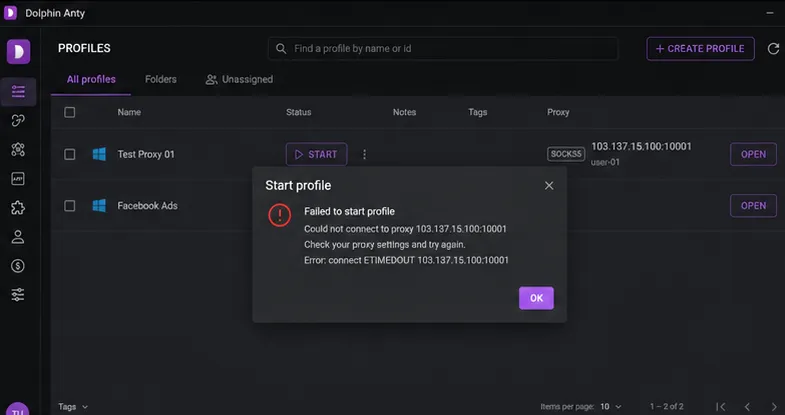
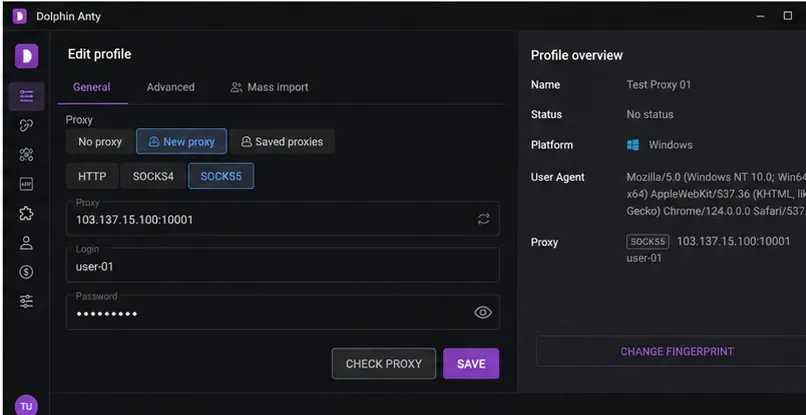
This happened with a profile named Test Proxy 01, configured with a SOCKS5 proxy at 103.137.15.100:10001 and login user-01, entered under Edit profile → General → Proxy → New proxy:
The trap: a saved proxy is not a verified proxy
The single most important thing to know about this error: Dolphin Anty lets you click SAVE on a proxy configuration without ever checking whether that proxy actually works. Saving only stores the fields you typed — protocol, host, port, login, password — it does not test the connection. The first real connection attempt often happens later, when you click START, which is exactly when ETIMEDOUT shows up and interrupts whatever you were about to do.
That’s why this error can appear on a profile that “was working yesterday” or one you just finished configuring: the configuration was saved successfully, but saved successfully and confirmed working are two different things in this UI.
Proxy-dead vs. config-error: how to tell them apart
ETIMEDOUT specifically means the connection attempt timed out — Dolphin Anty never got a response from 103.137.15.100:10001 at all. That can mean either of two different problems, and the error message alone doesn’t tell you which:
- The proxy is dead or unreachable. The server isn’t answering anyone, regardless of what you typed.
- Something in the configuration is wrong (a mistyped IP, a wrong port, a bad login/password) and Dolphin Anty is timing out trying to reach a target that doesn’t correspond to a real working proxy.
Checking the exact IP and port from the error — 103.137.15.100:10001 in this case — against an external checker like socksv5.net settles which one it is before you spend time re-typing fields: if it comes back dead there too, the proxy itself is the problem; if it comes back alive, the issue is in how it’s entered inside Dolphin Anty.
Fix, step by step
- Open the profile → Edit profile → General → Proxy.
- Confirm the protocol matches what your proxy provider actually gave you.
HTTP,SOCKS4, andSOCKS5are not interchangeable — selecting the wrong one causes exactly this kind of failure. In this case the correct protocol wasSOCKS5. - Re-check the proxy address and port for typos or stray characters:
103.137.15.100:10001. - Re-enter the login and password carefully. Wrong credentials can produce the same timeout-style failure as a dead proxy.
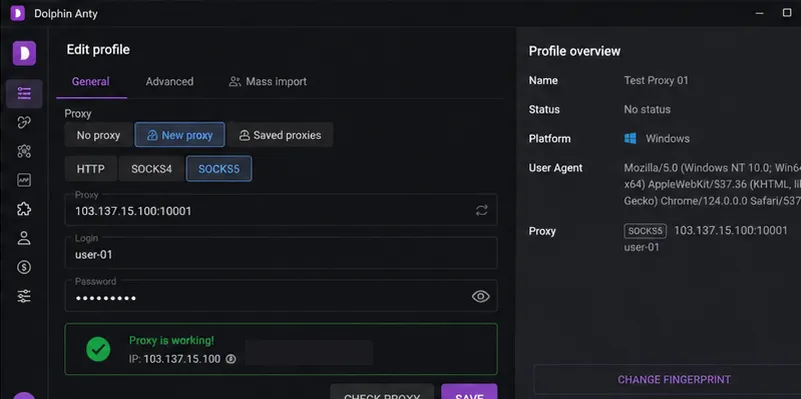
- Click CHECK PROXY — don’t skip straight to START. A failed check here means you’ve caught the problem before it interrupts a profile launch.
- Once the check returns “Proxy is working!” with the correct IP shown, click SAVE to make sure the verified settings are actually attached to the profile.
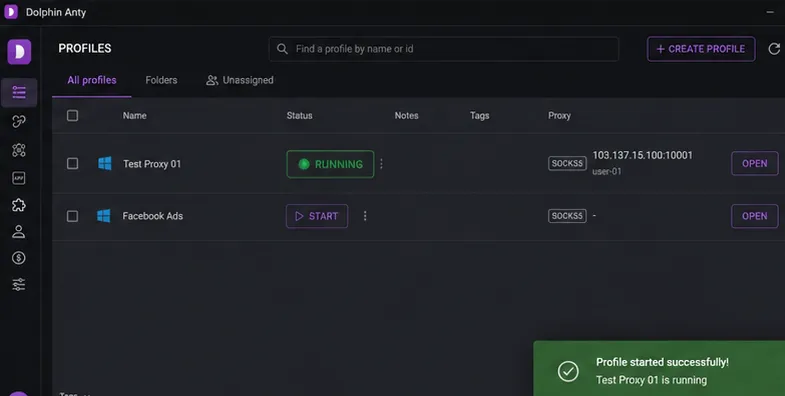
- Return to the Profiles page and click START again.
When this does NOT work
If CHECK PROXY keeps failing no matter how carefully you re-enter the protocol, address, and credentials, stop editing fields and check the IP:port directly against an external checker. A proxy that fails everywhere, not just inside Dolphin Anty, is dead — no amount of re-typing the same correct details will fix that, and the fix is to replace the proxy, not the configuration.
Conversely, if an external checker reports the proxy alive but Dolphin Anty still won’t connect, the mismatch points at something specific to how it’s entered here — most often the protocol selector (SOCKS5 vs HTTP vs SOCKS4) or a credential typo, since those are the two fields that don’t cause an obvious visual error until you actually try to connect.
Related
Also dealing with a connection timeout in a different antidetect browser? See AdsPower proxy connection failed — same underlying dead-proxy-vs-config-error question, different app.